ID3TagEd is an application to allow the creation and/or editing of MP3 ID3 version 1 tags, and a range of frames of the ID3 version 2 tags. It will run on Iyonix, BeagleBoard, PandaBoard and Raspberry Pi hardware, and should also run on earlier hardware.
A comprehensive user interface is provided to allow easy editing of version 1 and version 2 tags. The main window is shown below.
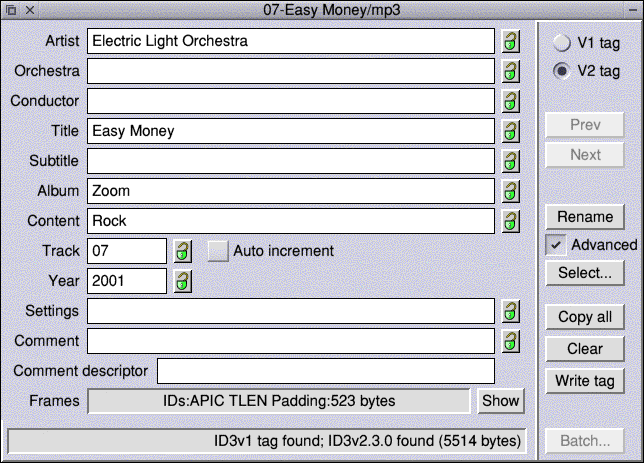
Not only can the tags of individual mp3 files be edited, but a selection of mp3 files can be edited as a batch process.
ID3TagEd has undergone a substantial rewrite of a number of its features since version 0.25 was released.
Downloads
Latest Version
 ID3TagEd is under continuous
development. The latest release is version 0.52 (8 Jun 2017).
ID3TagEd is under continuous
development. The latest release is version 0.52 (8 Jun 2017).
Download ID3TagEd version 0.52 (8 Jun 2017) - Complete version. File size 846 KB.
Note: if you wish ID3TagEd to deal with text frames in unicode format, you will need to have the Iconv module installed. See below.
Recent changes
Version 0.52
- Now uses tabs, rather than radio buttons, to switch panes in Choices and the main window
- Obscure zero page access fixed
- Choices dialogue can now be opened by adjust click on the iconbar icon
- A number of other fixes and internal rationalisations
Version 0.51
- New user option - keep original file timestamp
Version 0.50
- Handling of tags with text frames in unicode format greatly improved - ID3TagEd now uses the Iconv module for all unicode decoding. If you are using NetSurf, then you will have the iconv module installed. If not, the latest version (as of 6th Aug 2014) can be downloaded from http://www.netsurf-browser.org/projects/iconv/. Note that, although ID3TagEd can decode frames in unicode format, any frames it creates or modifies will be written in Latin1 format
- Added facility to add a wide range of text and link frames
- Improved display of less common text frames
- Improved checking when adding frames
- Added option 'Trim padding' to batch processing
- Improved handling of patterns for renaming, filling tags from full filename, etc.
- Now deals correctly with multiple images in the v2 tag
- Multiple images can be added to a tag
- Dealing with multiple COMM frames improved
- New editing options - strip n chars from start/end of text frame
- Some v.2 frames not conformant to the ID3 standard now recognised
- Multiple COMM frames can be added
- Add multiple images during batch processing
- Delete all images during batch processing
- Now using the 148 v1 tag genres as listed in LAME 3.98.4
A full listing of the changes in versions up to version 0.25 can be found here.